Medical Website Design: What Patients Need From a Clinic Website
What a medical or clinic website needs in 2026: online booking, services organised around symptoms, clear prices and insurance, trust signals and fast mobile pages.
 Eric Boluwatife
31 October 2026 · 8 min read
Why nowWritten while building MedAxis Group, a multi-specialty medical site that's in production now.
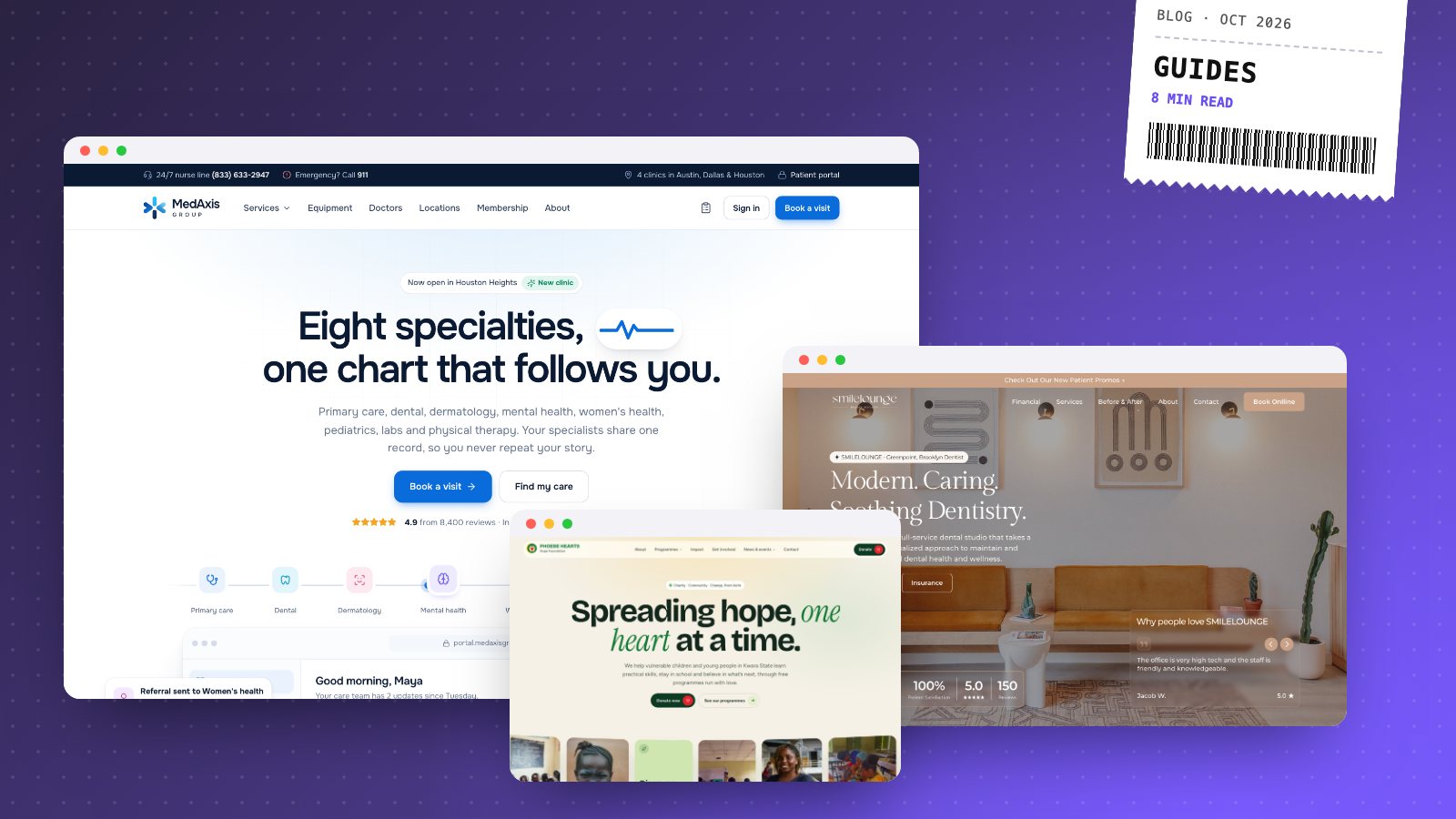
A good medical website does three jobs quickly: it tells a patient who they should see, whether you take their insurance or what it costs, and when they can be seen. Everything else on the site, from the photos to the blog, should support those three answers. Most clinic websites bury them under a list of departments and a phone number.
I'm a web designer and developer, and I'm building a multi-specialty medical group site, MedAxis Group, right now. This guide covers what I've learned designing for clinics, practices and health brands, and what I check on every healthcare project.
Who you're actually designing for
The person on your website is rarely browsing. They have a symptom, a worried parent's question or a referral letter, and they're usually on a phone. Many are anxious. Some are older and find small text hard to read. Some have never heard of you and are comparing you with two other clinics in another tab.
That changes the priorities:
- Speed matters more than polish. A slow page on a phone loses people before they see your name.
- Plain language beats medical vocabulary. "Skin checks and acne care" works better than "Dermatological services".
- The next step must be obvious. Book, call or find a location, on every page.
1. Make booking the main action
If patients can book online, that button should be the most visible thing on the site: in the header, in the first screen of every page and at the end of every service page. On phones, a sticky booking bar at the bottom of the screen works well.
Most practices already use a scheduling or practice management system. The website doesn't need to rebuild it. It needs to send people into it with as few taps as possible, ideally to the right service or clinician already selected.
Keep a tap-to-call number next to the booking button. Some patients will always prefer to talk to someone, and a nurse line or after-hours number is worth showing too.
2. Organise care around what patients have, not your org chart
Departments make sense inside a clinic. Patients don't think in departments. They think "my child has a rash" or "I need a check-up before a new job".
Two patterns help:
- A care finder. A short set of plain questions that points people to the right service and a bookable slot. On MedAxis, a few answers turn into a specialty and an appointment, instead of making people guess between eight departments.
- Service pages written around the visit. What it's for, what happens during the appointment, how long it takes, how to prepare and what happens after.
If you offer several specialties, show how they connect. Patients value hearing that their records and specialists are shared, so they don't repeat their story at every visit.
3. Be clear about money
Cost is one of the main reasons people delay care, and silence on price reads as "expensive". You don't need a full price list, but you should show:
- Starting prices for common self-pay visits, where you can.
- The insurance plans you accept, written out, so patients can search the page for their insurer.
- Payment options, such as card, payment plans, and in the US, whether HSA and FSA cards are accepted.
A short "What will this cost me?" section on each service page answers the question before it becomes a phone call.
4. Earn trust before the first visit
Healthcare is a high-trust decision. The page has to show real people and real places:
- Clinician profiles with photos, qualifications, specialties and languages spoken.
- Real photography of your rooms and team wherever possible. Stock photos of smiling doctors are easy to spot.
- Patient reviews, with first names or initials and the service they had.
- Clear contact details: address, opening hours, parking and accessibility notes.
SMILELOUNGE, a dental studio redesign concept I built for a real Brooklyn practice, leans on this. The practice's calm, homely rooms are its real difference, so the design carries that feeling instead of looking clinical.
5. Give every location its own page
If you have more than one clinic, each location needs its own page with the address, a map, hours, parking, the services offered there and the clinicians who work there. This helps patients, and it's how you show up when someone searches for a clinic near them.
For local search, also:
- Keep your Google Business Profile for each location complete and consistent with the website.
- Add structured data that marks each page as a medical clinic with its address, hours and phone number.
- Use the city or neighbourhood naturally in page titles and headings.
Ink Removal, a client project, is a directory built around this idea: people search by where they live, and every clinic page is built to be found locally.
6. Handle patient information carefully
This is the part most templates get wrong. A contact form that asks for symptoms, medications or medical history sends sensitive data by plain email, which you probably don't want.
My approach on healthcare sites:
- Keep general contact forms general: name, contact details and the reason for getting in touch, without medical detail.
- Send anything clinical through your secure booking or patient portal, which is built for it.
- Be careful with tracking tools on patient pages. Analytics and advertising pixels on booking or portal pages can collect more than you intend.
Rules differ by country. In the US, HIPAA may apply depending on what your site collects and who handles it. Your compliance lead or lawyer should confirm what applies to your practice. This guide isn't legal advice.
7. Design for every patient
Accessibility in healthcare isn't optional polish. Your patients include people with poor eyesight, shaky hands and slow connections.
- Readable text: at least 16px body text with strong contrast.
- Large tap targets for buttons and links.
- Clear headings and labels, so screen readers can follow the page.
- Fast pages with compressed images and no heavy sliders.
You can test speed, mobile layout and more on your current site with my free website check.
A clinic website checklist
| Page | What it must answer |
|---|---|
| Home | Who you help, how to book, where you are, which insurance you take |
| Services | What each visit involves, how long it takes, how to prepare, what it costs |
| Care finder | Which service fits my symptom or need |
| Clinicians | Who will I see, and what are their qualifications |
| Locations | Address, map, hours, parking, services at that location |
| Insurance and pricing | Do you take my plan, and what will I pay |
| Booking | The fastest route into your scheduling system |
What a clinic website costs
A focused one-page site for a single clinic usually starts from $1,200 with me and takes 1 to 2 weeks. A full multi-page site with service pages, clinician profiles and location pages starts from $2,500 and usually takes 3 to 6 weeks. Patient portals and custom booking flows are web app work and are quoted separately. My pricing guide breaks down what drives the cost.
You can see more of my health work on the medical and clinic websites page.
If you run a clinic or a medical group and your website isn't bringing in bookings, book a 30-minute call. I'll look at your current site with you and send a fixed-price quote within a day.