Church and Nonprofit Website Design: What Actually Matters
Church and nonprofit website design that works: clear service times, sermons and livestreams, trusted giving, volunteers, impact stories and easy editing.
 Eric Boluwatife
9 March 2026 · 7 min read · Updated 31 October 2026
Why nowWritten after designing for Dovelight Network and Phoebe Hearts Hope Foundation.
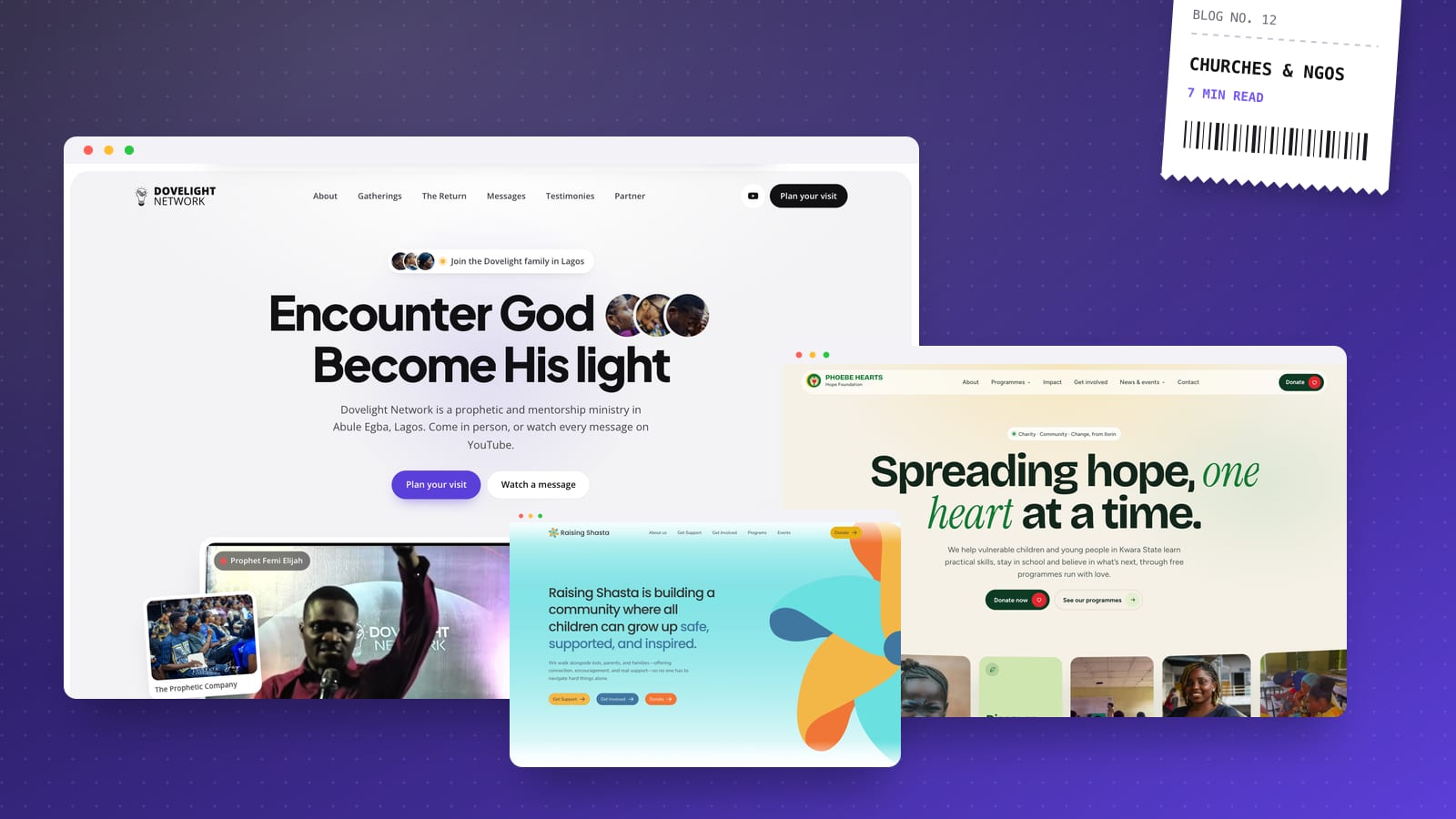
Good church and nonprofit website design isn't about flashy effects. It's about answering a first-time visitor's questions in seconds (when, where and what to expect), making giving simple and trustworthy, showing real people and real impact, and making the site easy for volunteers to update every week. Get those four right and your website becomes a front door to your community instead of an online brochure nobody checks.
I've designed and built sites for churches, ministries and nonprofits, including a prophetic and mentorship ministry in Lagos, a youth-empowerment foundation in Ilorin and a community nonprofit in the US. The details differ, but the same priorities come up every time.
Design for the first-time visitor
Your regular members already know when service starts. The website is mainly for the person who doesn't: someone new to the city, a parent looking for a youth programme, a potential donor checking you're legitimate.
That visitor wants three things quickly: who you are, when and where to come, and whether they'll feel welcome. The homepage should answer all three before they scroll far.
- Use warm, people-first photography. Real faces from your services, outreaches and events build trust far better than stock images or empty buildings. Ask permission before featuring anyone, and take extra care with children.
- Keep the tone welcoming and plain. Avoid insider language that only members understand.
- Add a "Plan your visit" or "New here?" page. Cover what a service is like, how long it lasts, what people usually wear, what's available for children, parking and accessibility.
- Make the main action obvious: visit, watch online, give or get involved.
Light, open layouts tend to suit churches and community organisations better than dark, dramatic designs. Your website should feel like walking into a friendly room.
Service times, locations and events
This is the information people search for most, so treat it as the most important content on the site.
- Put service times on the homepage, not three clicks deep, and keep them up to date.
- Link the address to Google Maps and give directions using landmarks people actually know, which matters a lot in Nigerian cities.
- Give each branch or campus its own page with its own times, address, contact details and leaders, if you have more than one location.
- Manage events in a CMS with a date, time, location, image and registration link, so past events drop off automatically.
- Set up a Google Business Profile for each location with accurate service times. Many people will find your times on Google before they ever reach your website.
Sermons, livestreams and media
For churches and ministries, media is often the main reason people return to the site during the week.
- Embed your livestream from YouTube or Facebook on a dedicated "Watch live" page, with a clear note of when you go live.
- Build a searchable sermon archive organised by series, speaker, date and topic or scripture, so people can find that message a friend mentioned.
- Offer audio too. Many people prefer to listen on a commute, so link to your podcast feed or audio files.
- Keep embeds lightweight. A video embed can add a lot of weight to a page. Load the player only when someone taps play, and never autoplay video on mobile data.
For nonprofits, the equivalent is a library of stories, reports and videos about your work, organised so donors and partners can quickly find evidence of impact.
Giving and donations people trust
Online giving is where a website can make the biggest practical difference. The aim is to remove every bit of friction and doubt.
Offer the payment options your people actually use
- In Nigeria, use a local payment gateway such as Paystack or Flutterwave. They support cards, bank transfers and USSD, which covers most givers.
- Show bank transfer details clearly for people who prefer to pay from their banking app: account name, bank and account number, with a copy button.
- Add a WhatsApp link so givers can send a payment confirmation or ask a question, if that's how your team already works.
- Give diaspora and international supporters a way to give in their own currency, using a gateway that supports international cards or a processor available in their country.
Make it clear and trustworthy
- Explain what giving supports, and offer designated funds (tithes, offerings, building project, a specific programme) if you have them.
- Offer recurring giving where your gateway supports it, which helps your planning and suits regular givers.
- Send automatic receipts and a genuine thank-you.
- Keep the giving page on your own domain with your branding, so people aren't sent to an unfamiliar page they're unsure about.
- Nonprofits should publish reports and registration details, so donors can see where money goes.
Volunteers, membership and community
Your website should help people take the next step from visitor to participant.
- Volunteer pages that list real roles, the time commitment and a short sign-up form, instead of a vague "get involved" button.
- Simple forms for prayer requests, counselling, membership or programme applications, with clear notes on who sees the information. Treat personal and prayer requests as sensitive data, and keep them out of public spaces.
- Ways to stay connected: a newsletter sign-up, a WhatsApp channel or community link, and links to your social accounts.
- Leader and team pages with names, photos and roles, so people know who they'll meet.
Impact stories for nonprofits
Donors and partners give to outcomes, not organisations. Show them what happens because of their support.
- Create a page for each programme, explaining the problem, what you do, who benefits and how to support that programme specifically.
- Tell individual stories, with consent, including photos and quotes from the people involved. Be especially careful with minors and vulnerable people: use first names only or change identifying details when in doubt.
- Share numbers you can stand behind, such as people reached or events held, and keep them updated. Never round up or guess.
- Publish annual reports and highlight partners and sponsors.
- Put a donate or volunteer call to action on every story page, so the moment someone is moved to act, the next step is right there.
Accessibility and low-bandwidth performance
Church and nonprofit audiences are usually more varied than a typical business's: older members, people with visual impairments, people on older phones and limited data.
- Use readable font sizes (16px minimum for body text) and strong colour contrast.
- Add alt text to images and captions to videos.
- Make buttons large and easy to tap.
- Keep pages light. Compress images, avoid heavy animation and test on a mid-range phone over mobile data. In Nigeria especially, a fast site is an inclusive site.
- Make sure everything works without a login, apart from members-only areas if you have them.
Easy editing for volunteers
Most church and nonprofit websites are updated by volunteers or a small, busy team. If editing is hard, the site goes out of date, and an outdated site quietly tells visitors you're not active.
- Choose an easy CMS. I build on Framer, Webflow or code-based sites with a visual editor like Keystatic, depending on budget and who will do the updates.
- Use structured fields for sermons, events, stories and service times, so volunteers fill in a form rather than designing a page.
- Give different people the right access, so the media team can upload sermons without touching the giving page.
- Record a walkthrough video so new volunteers can learn the system without a training session.
- Make sure your organisation owns the domain, hosting and accounts, not one volunteer or the developer.
Every site I deliver ships with a CMS and a walkthrough video, and launch is followed by 30 days of free support. Depending on your needs, that's usually a multipage website or a faster no-code build on Framer or Webflow.
Two builds that put this into practice: Dovelight Network, a church and mentorship ministry site, and Phoebe Hearts Hope Foundation, an NGO site built around giving and volunteering. There is more on my church and nonprofit websites page, and you can see how your current site scores with the free website check.
If you're planning a new website for your church, ministry or nonprofit, book a 30-minute call. I'll listen to how your community works and send a fixed-price proposal within a day. If you're comparing designers, my guide to hiring a web designer in Lagos covers what to ask.